
TL;DR: Shipping label printing cost includes more than paper: it usually covers ink or toner, wasted labels, reprints, maintenance, and the time it takes to get each label out. If shipping days feel slower and pricier than they should, this article helps you see where the waste is and when a simpler thermal workflow starts making more sense.
If you’ve ever paused a shipping day to fix a crooked label, replace ink, or print the same order twice, you already know shipping label printing cost is rarely just the label. What looks cheap at first can get expensive fast once reprints, wasted supplies, and extra steps start piling up.
For many small businesses, the real problem is not one big fee. It is the steady drag of ink, misprints, and one-by-one printing that keeps slowing everything down.
The goal is to make those hidden costs easier to spot, so it is easier to choose a setup that saves time, cuts waste, and creates fewer surprises.
Here’s What We’ll Cover
Why do most small businesses overpay just to print a label?

Most small businesses overpay just to print a label because the real expense is rarely the label alone. The cost usually grows through ink or toner, wasted labels, reprints, bad alignment, and the time lost fixing small printing problems that keep interrupting shipping work.
A label can look cheap when you only count the sheet or roll in front of you. The problem is that shipping rarely happens in that clean, perfect way.
You print one label. It comes out slightly off. You print it again. Then the printer grabs the paper weirdly, or the barcode looks fuzzy, or you realize you used the wrong setting. Suddenly a simple task turns into a little repair job in the middle of your packing flow.
That is how a low-looking cost turns into a high cost per label in real life.
The difference between visible cost and hidden cost
Visible cost is easy to spot. It is the paper, the label stock, or the cartridge you had to buy.
Hidden printing costs are the ones that sneak in around the edges. They show up as wasted label sheets, extra setup time, printer maintenance, reprints, and those little stops that break your rhythm when you are trying to get orders out.
If shipping day keeps feeling heavier than it should, you are probably paying for more than the label.
What is the real shipping label printing cost?

The real shipping label printing cost includes more than label paper. It can include ink or toner, wasted sheets, test prints, printer upkeep, reprints, and the labor it takes to get labels printed correctly. That is why a low-looking label price can still create expensive shipping days.
For most sellers, the real cost to print a shipping label may include:
- label stock or paper
- ink or toner
- test prints
- reprints
- printer cleaning or upkeep
- wasted labels from bad settings
- time spent fixing avoidable problems
That last one matters more than people think. If you spend extra time on every label, the process can feel cheap on paper and expensive in practice.
Why per-label math often misses the real problem
Per-label math is useful, but it can hide the bigger issue. Two sellers may use similar label stock and still have very different shipping days.
One seller prints clean labels with a repeatable workflow. The other keeps adjusting settings, replacing ink, and redoing labels. On paper, their setup may look similar. In real life, one is paying more in waste and frustration.
That is why shipping label printing cost should be treated like an operating cost, not just a supply cost.
Which hidden costs drain money first?

The hidden costs that usually drain money first are ink or toner replacement, misprints, wasted labels, repeated setup checks, and small delays that break your packing flow. None of these look huge in isolation, but together they can make shipping feel slower, messier, and more expensive than expected.
Ink costs often feel manageable until you start printing labels regularly. Then it becomes a repeating expense that never really leaves your workflow.
You are not just paying for one cartridge. You are paying for the habit of needing one. And when you run out at the wrong moment, the cost is not only the replacement. It is the interruption.
Misprints, reprints, and wasted label stock
Misprints are easy to brush off because they happen one label at a time. But repeated label reprints can quietly eat through supplies.
A few crooked prints here, a few unreadable labels there, and suddenly your wasted label sheets are no longer random. They are a pattern.
That pattern matters because it affects both cost control and label quality.
“Small” delays that turn into weekly friction
Some costs are not physical at all. They are the small delays you barely notice until they show up every week.
Waiting for a file. Opening one more PDF. Adjusting settings again. Checking whether the label printed at the right size. None of it sounds dramatic, but together it creates workflow drag.
And workflow drag is still a cost.
Is a thermal printer actually cheaper than a regular printer for shipping labels?

A thermal printer is often cheaper over time if you print labels regularly because it removes ink and toner from the process and usually cuts down on printing friction. A regular printer can still work for occasional use, but its real cost rises when reprints, supply replacement, and workflow interruptions become routine.
Here is the simplest comparison:
| Setup | What it does well | Where costs creep in |
|---|---|---|
| Regular printer | Fine for occasional labels | Ink, toner, paper waste, slower setup |
| Thermal label printer | Better for repeat label printing | Upfront hardware choice, label stock planning |
A thermal label printer is not magic. It just removes one major source of recurring friction: ink.
That alone can change the math for a seller who prints often.
When a regular printer is still good enough
A regular office printer may still be fine if you only ship once in a while and your process stays simple. If your labels come out clean, you are not reprinting often, and shipping day does not feel chaotic, you may not need to change anything yet.
That is an important point, because not every problem needs a new tool.
What changes once label printing becomes routine
Once label printing becomes part of your normal weekly flow, the standards change. You stop asking, “Can this printer do it?” and start asking, “Why is this still taking so much effort?”
That is the moment when a dedicated thermal setup starts to make more sense.
If you are already noticing recurring ink costs, reprints, and wasted time, a Rollo printer fits naturally here because it removes ink from the process and gives you a cleaner shipping label setup without turning fulfillment into a bigger project.
Ready to stop paying for ink and reprints? Explore the Rollo Wireless Printer.
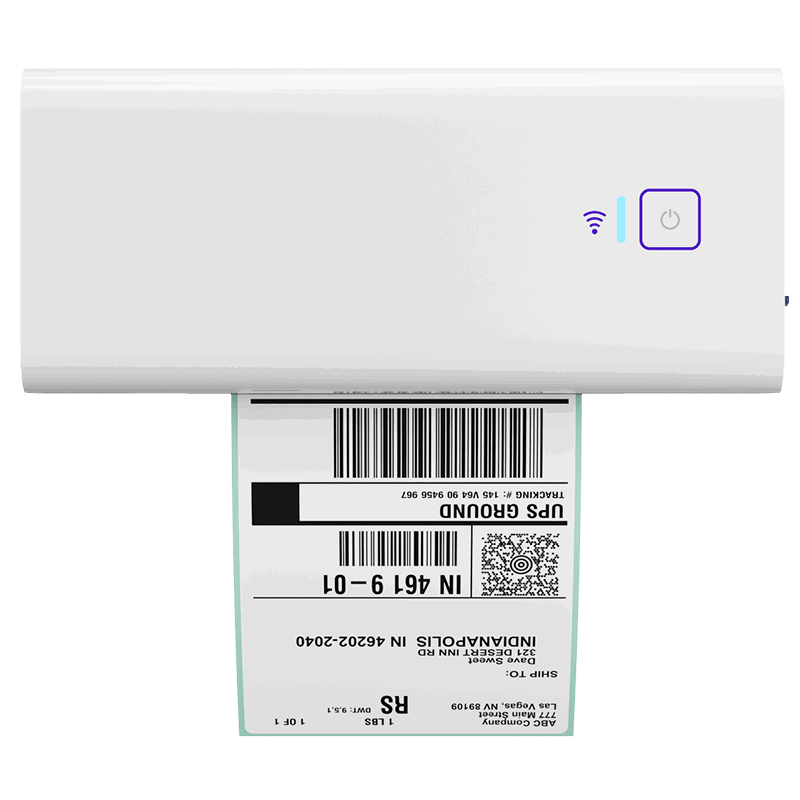
If label printing keeps slowing down your shipping day, a thermal setup can help cut recurring supply costs and reduce avoidable print friction. The Rollo Wireless Printer gives small businesses a cleaner, simpler way to print shipping labels without the usual ink-related hassle.
How much is one-by-one printing costing your workflow?

One-by-one printing can quietly cost more than supplies alone because each label requires repeated clicks, PDF handling, settings checks, and interruptions that break fulfillment rhythm. Even when each step feels minor, the process can turn shipping day into repetitive admin work that steals time from packing and order management.
Printing labels one at a time sounds manageable until you are doing it over and over.
Download. Open. Print. Check. Repeat.
That kind of manual printing workflow adds up fast, especially when you are also packing boxes, checking order details, and trying not to miss anything. Even a decent printer can feel expensive when the flow around it is clunky.
Why multi-channel selling makes the problem worse
If you sell on Shopify, Etsy, eBay, or WooCommerce, things get messy faster. Orders live in different places. Labels may come from different screens. Your shipping workflow starts feeling less like one system and more like a pile of tabs.
That is where small mistakes show up more often. So does wasted time printing labels.
What a broken print flow looks like on a busy ship day
A broken flow usually looks ordinary from the outside. You are not panicking. You are just doing too many little steps.
That might mean checking one marketplace, opening another tab for a label, fixing a print setting, then going back to see which orders are already done. It works, but it is brittle.
This is where Rollo Ship becomes useful in a very practical way. If you are ready for fewer surprises, an order dashboard and batch-friendly label flow can bring more visibility and less tab chaos to shipping day.
When should you switch to a shipping label printer?

You should think about switching when label printing stops feeling like a small task and starts creating repeat waste, repeat delays, or repeat frustration. If you are reprinting labels, buying ink often, or dreading shipping sessions, your current setup may already be costing more than it saves.
Your setup may be too expensive if:
- you reprint labels often
- you keep replacing ink or toner
- label printing slows down packing
- you fix settings again and again
- shipping days feel heavier than they should
None of those signs need to be dramatic. Repetition is what matters.
A simple stay-or-switch checklist
Stay with your current setup if most of this is true:
- you ship only occasionally
- labels usually print correctly
- your workflow still feels simple
- you are not fighting recurring supply costs
Consider switching if most of this is true:
- you print labels every week
- you waste labels often
- you keep dealing with misprints
- you want faster label output
- you want more predictable shipping costs
What to compare before buying a shipping label printer
Look at more than the printer itself. Compare:
- recurring supply cost
- common label sizes
- print consistency
- setup friction
- how well it fits your shipping routine
If your main pain is not “printing is impossible,” but “printing keeps interrupting everything,” that is usually a strong sign the workflow needs to improve, not just the hardware.
That is where a Rollo-style setup can make sense. A thermal printer helps reduce recurring print friction, and Rollo Ship adds order workflow relief if you are ready to stop handling labels one by one.
What does a lower-surprise label workflow look like?

A lower-surprise label workflow is simple, consistent, and easy to repeat. Orders are visible in one place, common label sizes like 4×6 stay easy to use, and printing feels connected to fulfillment instead of becoming a separate mini-project that creates waste, rework, and uncertainty every time you ship.
A cleaner workflow starts with visibility. You should be able to see what needs to ship without guessing which orders were already printed, packed, or handled.
That kind of order dashboard matters because confusion often creates rework.
Why standard 4×6 labels reduce mistakes
Standard 4×6 shipping labels are practical because they simplify the print flow. When your label size is consistent, you usually spend less time checking whether the format will come out wrong.
That does not solve everything, but it often reduces one common source of mistakes.
How batch-friendly printing changes shipping day
Batch-friendly printing changes the feeling of the work. Instead of reacting to each label as a separate job, you move through shipping in a more repeatable order.
That is why the right setup can feel calmer, not just faster. If your current flow is full of little interruptions, Rollo’s printer plus Rollo Ship can fit here as a more organized way to handle labels, orders, and shipping tasks together.
What if you only ship occasionally?

If you only ship a few labels now and then, a regular printer or carrier-based option may still be enough. The goal is not to force a switch too early. It is to notice when occasional printing becomes recurring waste, recurring hassle, or recurring supply spend that no longer feels minor.
Store printing or carrier-based options may be fine for occasional use. They can help when you do not want to maintain a printing setup at home or in a small workspace. If you only ship a few labels now and then, a regular printer or carrier-based options may still be enough.
But once shipping becomes regular, convenience fees, file handling, and repeat trips can start feeling like their own kind of friction.
When “good enough” stops being good enough
Good enough usually stops being good enough when the workaround becomes a routine. If you are printing often enough to notice recurring hassle, that is already a signal.
The right time to change tools is not when things break completely. It is when the current method keeps creating avoidable waste.
Want a simpler way to manage labels, orders, and shipping in one flow?
When printing labels is only part of the problem, a better workflow matters just as much as better hardware. Rollo Ship helps bring more clarity to your shipping process so you can compare rates, manage orders, and print with fewer surprises.

Final Words
If printing labels keeps interrupting your shipping day, the real problem may not be the label at all. It may be the repeated waste, reprints, and extra steps around it. Once you can see where that friction shows up, it becomes easier to choose a setup that saves time, cuts avoidable cost, and makes fulfillment feel more organized. The goal is not to chase a perfect system. It is to build one that creates fewer surprises every time you ship.
Follow Rollo on:
Frequently Asked Questions About Overpaying for print labels
📌 Q: What shipping setup do I actually need as a first-time seller?
💭 A: You need a setup that covers the basics in a repeatable way: package details, label creation, label printing, packing, and tracking. It does not need to be advanced. It just needs to make standard orders easier to handle without confusion.
📌 Q: Can I keep using a regular printer for shipping labels?
💭 A: Yes, if you ship only occasionally and your process still feels simple. It becomes less practical when ink, reprints, and extra setup time start showing up every week.
📌 Q: Do misprints really make that much difference?
💭 A: They can. A few bad labels may seem minor in one session, but repeated label reprints create supply waste and slow down packing over time.
📌 Q: store printing cheaper than owning a setup?
💭 A: It can be for occasional use. But if you print often, the extra handling, time, and repeat trips may make it less attractive than it first appears.
📌 Q: Do I need 4×6 labels?
💭 A: Not always, but 4×6 labels are common for a reason. They are practical, widely used, and usually easier to keep consistent in a shipping workflow.
📌 Q: How do I know when workflow issues are the real problem?
💭 A: If labels technically print but shipping still feels slow, the process may be the real issue. Too many tabs, too many steps, and too much one-by-one handling are all clues.
📌 Q: What should I compare before buying a label printer?
💭 A: Compare recurring supply cost, print reliability, label format consistency, and how much the printer actually simplifies your shipping day.


