
TL;DR: An inkless printer prints with heat instead of ink or toner. Most are direct thermal printers: a heated printhead darkens special heat-sensitive paper or labels. They’re fast, cheap to run, and low-maintenance, which is why they print most shipping labels and receipts. The trade-offs are black-only output, special media, and prints that fade over months, not years.
Inkless Printers: At a Glance
- What it is: a printer that uses heat, not ink cartridges or toner, to print.
- Main type: direct thermal, used for labels and receipts. Thermal transfer uses a ribbon; ZINK uses color photo paper.
- What you keep buying: thermal labels or paper. Nothing else.
- Best for: shipping labels, barcodes, receipts, and short-term product labels.
- Limits: black only, special media, and prints that fade with heat, sunlight, and friction.
- For shipping, pick a 4-inch-wide printer. The Rollo Wireless prints a 4×6 label in about a second at 203 dpi.
In This Guide
The digital revolution is not limited to smartphones and computers. It extends to various parts of our lives, and one such extension is the modern marvel of inkless thermal printers. The concept of printing without ink, once a sci-fi dream, has now become a reality. The thermal printing technology revolutionized the way we look at the printing process, making it simpler, more efficient, and more environmentally friendly.
Inkless printers, as the name suggests, do not use ink cartridges or toners. Rather than relying on conventional ink, these printers leverage thermal technology to create text and graphics on specially designed thermal paper or labels. This advancement has initiated a thermal revolution in the printing industry, creating a radical shift in how we print.
This guide explains how inkless printers work, the main types, their real pros and cons, and where they fit best, from shipping labels to receipts.
How Has Printing Technology Evolved into the Inkless Revolution?
Printing has progressed from manual block printing in ancient times to Gutenberg’s mechanical movable type in the 15th century, through to today’s digital methods, but the arrival of inkless printers marks the most transformative shift yet. Unlike traditional inkjet models that demand constant cartridge changes, ink monitoring, and upkeep, inkless printers use direct thermal technology to deliver a faster, cleaner, and low-maintenance printing experience, redefining efficiency for modern users.
What Is An Inkless Printer?
An inkless printer is a printer that makes text and images without ink or toner cartridges. Instead, a heated printhead marks specially coated thermal paper or labels. Most inkless printers are direct thermal printers, the kind used for shipping labels, barcodes, and receipts. They print in black, need thermal media, and cost very little to run. This technology has paved the way for the thermal revolution in the printing industry, enhancing efficiency and reducing environmental impact.
How Do Inkless Printers Work?
Their operation is remarkably innovative yet straightforward. They work on the principle of thermal printing. When thermal paper, coated with a special heat-sensitive compound, passes over the thermal print head, it reacts to the heat and changes color to form text or images.
An excellent example of this technology in action is the Rollo small label printers. With the capability of printing up to 325,000 feet of labels (roughly 650,000 shipping labels) without any ink, Rollo printers signify a major leap in inkless printing technology. Moreover, they offer intelligent label detection, eliminating the need for manually cropping your labels. All you need to do is send the data to Rollo, and it takes care of the rest.
Do Inkless Printers Print Color?
Typically, they are used for black-and-white printing, such as receipts or shipping labels. However, technological advances have introduced Zink (Zero Ink) printers, which are capable of full-color printing. These printers use special paper embedded with color-forming elements, which are activated by heat to produce color prints.
A monochrome thermal printer can still do plenty for a brand: black designs on white or pre-colored label stock. See how sellers use inkless sticker printers for branding.
What Are The Types of Inkless Printers
There are three main kinds of inkless printing. Direct thermal printers heat coated paper or labels and handle shipping labels, receipts, and barcodes. Thermal transfer printers melt a ribbon onto the label for longer-lasting prints, so they still use a consumable. ZINK printers make small color photos on special crystal-coated paper.
| Type | How it prints | What you keep buying | Best for |
|---|---|---|---|
| Direct thermal | Heat darkens coated paper or labels | Thermal labels or paper | Shipping labels, receipts, barcodes |
| Thermal transfer | Heat melts wax or resin from a ribbon onto the label | Labels plus ribbons | Long-life labels, asset tags, outdoor use |
| ZINK (zero ink) | Heat activates color crystals in the paper | ZINK photo paper | Small color photos and stickers |
Inkless printers come in various sizes, from pocket-sized Bluetooth devices to desktop and industrial models. Width matters for shipping: a standard shipping label is 4×6 inches, so you need a printer that takes 4-inch-wide labels, and many pocket printers only print narrow ones. For a closer look at the most common type, see our guide to the direct thermal printer.
Rollo offers two direct thermal label printers, a wireless model and a USB model. Both are compact desktop printers that print about one 4×6 label per second at 203 dpi. The wireless model works with Mac, iPhone, iPad, Android, Windows, Chromebook, and Linux. It’s also AirPrint and Wi-Fi certified, so you can print from your phone, from any app, on any device. The USB model connects with a cable and works with Mac and Windows.
What Are the Pros and Cons of Using an Inkless Printer?
Inkless printers offer clear advantages such as lower long-term costs, faster printing, minimal upkeep, and compact size, making them ideal for high-volume printing. However, they also come with trade-offs, including limited color options, potential print fading, and the need for specialized thermal paper.
Pros
Cost-Effective
In the context of inkless printers, the term “cost-effective” means more than just the printer’s price tag. While the upfront cost may be higher than a regular printer, the real savings come from the elimination of consumables. With inkless printers, you won’t need to worry about constantly replacing pricey ink or toner cartridges. This lowers the total cost of ownership over the printer’s lifespan, making inkless printers a more affordable option in the long run.
Speed
The need for speed is another reason many businesses and individuals are switching to inkless printers. Direct thermal printers print with heat alone, so there’s no drying time, and they generate text and barcodes much faster than most ink-based printers. The speediness of the printing process can be a great asset in high-volume environments like offices, retail, or logistics, where efficiency is paramount.
Less Maintenance
The maintenance demands of traditional ink or laser printers can be tiresome and time-consuming. This includes dealing with tasks like cleaning print heads, clearing paper jams, and dealing with messy ink spills. Inkless printers sidestep most of these issues, offering a more straightforward user experience. There’s no ink to replenish, which means less cleaning and more printing. The one part to look after is the printhead: a quick wipe with an alcohol pad every so often keeps prints sharp.
Compact Size
Many inkless printers are small, and pocket models run on batteries for printing on the go. Desktop label printers like Rollo’s are compact too, about 8 × 4 × 4 inches, so they fit on a packing table or a home office shelf. The wireless model prints over Wi-Fi from any device in the room, with no cable to the computer.
Cons
Limited to Monochrome
While inkless printers excel in many areas, they typically have a limitation when it comes to color printing. Most inkless or thermal printers are limited to black-and-white printing, which can be a drawback if you require colored labels or documents. However, advancements in Zink (Zero Ink) technology now offer color printing options without the need for ink, bridging this gap to some extent.
Print Longevity
One characteristic of inkless printers is that the printouts can fade over time, particularly if they’re exposed to heat or direct sunlight. This is because the heat-sensitive paper used in these printers responds to temperature changes. While this won’t be an issue for documents or labels meant for short-term use, it’s worth considering if you need long-lasting prints.
Thermal Paper Required
The need for special thermal paper is another factor to consider when investing in an inkless printer. Since these printers create images or text by applying heat to heat-sensitive paper, regular paper won’t work. Depending on the volume of printing you do, the cost of this specialized paper could add up. It’s crucial to factor this into your overall budget when considering an inkless printer.
| Inkless (direct thermal) | Inkjet or laser | |
|---|---|---|
| What you keep buying | Thermal labels only | Ink or toner, plus paper or label sheets |
| Shipping-label workflow | One peel-and-stick 4×6 label, no cutting | Print on a sheet, then cut and tape, or use label sheets |
| Speed | About a second per 4×6 label on a desktop model | Slower per label, with warm-up or drying time |
| Color | Black only | Full color |
| How long prints last | Months; fades with heat, light, and friction | Years |
| Best for | Shipping labels, barcodes, receipts | Documents, photos, color marketing |
In conclusion, while there are several pros and cons to using inkless printers, many find that the benefits, like cost savings, speed, and ease of maintenance, outweigh the drawbacks. As technology continues to advance, we can expect the limitations of inkless thermal printers to further decrease, making them an increasingly attractive option for many printing needs.
What Are The Benefits of Inkless Printing?
Inkless printing comes with a host of benefits. It is cost-effective as it eliminates the ongoing expense of ink cartridges. Additionally, these printers are faster, quieter, and require less maintenance than conventional printers. They also take up less space, making them perfect for small workspaces.
The efficiency of Rollo’s inkless label printers is a testament to these benefits. With the ability to handle extensive printing without any ink and intelligent label detection technology, Rollo printers offer unparalleled efficiency and convenience.
What Makes Rollo Inkless Printers Different from Traditional Printers?
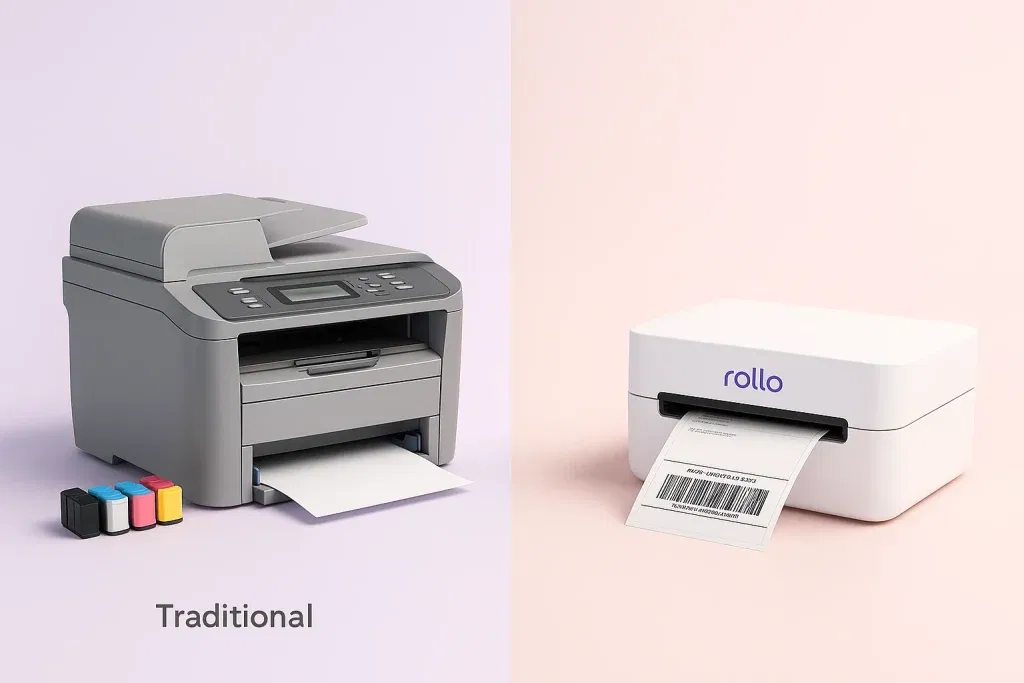
Rollo inkless printers stand apart from traditional ink or laser models by eliminating the need for cartridges altogether—no ink, no toner, no mess. Instead, they use direct thermal technology to deliver fast, reliable, and low-maintenance printing, making them ideal for high-volume tasks like shipping labels and packaging.
This streamlined approach not only reduces ongoing costs but also boosts efficiency, especially for e-commerce, retail, and logistics businesses that rely on speed and accuracy. Compact, modern, and built for today’s connected world, Rollo printers redefine what users can expect from a label printer.
Among the ranks of ink-free printers, Rollo’s label printers stand apart. These printers encapsulate the essence of modern printing — compact, fast, and fuss-free. Forget about bulky printers that commandeer your desk space. Rollo’s label printers are designed with a small footprint, seamlessly fitting into any work environment, be it a bustling office or a cozy home setup.
Wireless and Ink-free

USB and Ink-free

However, don’t let their compact size fool you. When it comes to performance, Rollo printers punch well above their weight. With a remarkable printing speed of one label per second, they make short work of any label printing task. That’s 60 labels in a minute, and 3,600 in an hour — think of the time saved and the productivity gained.
Rollo’s label printers also lend themselves perfectly to the demands of today’s connected world. The wireless model works with Mac, Windows, iPhone, iPad, Android, Chromebook, and Linux, and prints through AirPrint and Wi-Fi, so you can print from your phone, any app, or any file without a cord. The USB model works with Mac and Windows. The wireless model also takes any direct thermal label from 1.57 to 4.1 inches wide, so you’re not locked into one brand of labels.
In a nutshell, when compared to traditional printers, Rollo’s printers transform the often tedious task of printing into a swift, streamlined, and sustainable process. They embody the perfect blend of modern design, cutting-edge technology, and user-friendly operation.
Whether you’re an individual needing occasional label printing or a business requiring frequent high-volume printing, Rollo’s label printers deliver every time. It’s not just about printing labels, it’s about enhancing your printing experience. It’s the Rollo difference.
Rollo Wireless Label Printer
Inkless 4×6 labels in about a second
Direct thermal at 203 dpi with no ink or toner, ever. Prints over Wi-Fi from Mac, Windows, Chromebook, iPhone, iPad, and Android, and takes any direct thermal label 1.57 to 4.1 inches wide.

Are Ink-Free Printers Cheaper?
Yes, in the long run, ink-free printers can be significantly cheaper. While the initial cost of an ink-free might be higher than a traditional inkjet or laser printer, it’s the ongoing cost that makes a difference. Inkless printers don’t require costly ink or toner replacements, which can significantly reduce operating costs over time.
If you’re weighing the move from an inkjet, our guide to switching to thermal label printers walks through the costs.
What are the Roles of Inkless Printers in Environmental Sustainability?
Inkless printers support environmental sustainability by significantly reducing waste—eliminating the need for disposable ink and toner cartridges that often end up in landfills. Unlike traditional printers, they rely on direct thermal technology, which not only lowers resource consumption but also minimizes the environmental impact of printing.
This cleaner, more efficient method helps businesses reduce their carbon footprint while also cutting costs, making inkless printing a smart choice for eco-conscious operations. Growing awareness of these benefits is one reason the global thermal printing industry continues to expand, with a positive outlook reflected in the latest Thermal printer market CAGR and forecast.
There’s one caveat. Many thermal papers use a BPA or BPS coating, and coated thermal paper can’t always go in paper recycling. If that matters to you, choose BPA-free label stock. Our essential facts about thermal printer paper covers what to look for.
Inkless printers don’t just reduce ink waste—they can also help you cut printing costs while making your operations more eco-friendly. Curious how sustainable printing saves money in practice? Check out our guide on how sustainable printing can lower your costs.
Ink-free Printer Paper
Ink-free printer paper, or thermal paper, has a special coating that reacts to heat. When this paper passes through a thermal printer, the heat from the printer causes the coating to react, creating darkened areas that form images or text. The use of this paper is one of the reasons why printers that don’t use ink are more environmentally friendly since they produce less waste compared to traditional printers.
Inkless Printing and the Future of Printing Technology
As technology continues to advance, inkless printing holds immense potential. Not only does it simplify the printing process, but it also pushes the boundaries of what is possible with printing technology. With innovations like Rollo’s compact and intelligent label printers, we are witnessing just the beginning of this thermal revolution.
The ability to print vast amounts of labels without any ink, combined with intelligent label detection technology, paints a promising picture of the future of printing technology.
Common Questions About Inkless Printers
The concept of inkless printing is still new to many, and it’s natural to have questions. Some common inquiries include thermal paper’s cost-effectiveness, print quality, and the printers’ lifespan. As users discover the practicality and benefits of ink-free printers, we believe they will become a staple in homes and businesses alike.
Practical Applications of Inkless Printers
In the bustling retail sector, ink-free printers like Rollo’s models streamline the process of printing price tags, inventory labels, or receipts, supporting the sector’s high-paced demands. In healthcare, they enable swift printing of patient IDs or prescription labels, promoting efficiency and accuracy.
At home, these printers are excellent for crafting, home businesses, or even managing household organization with clearly printed labels. This versatility of Rollo’s label printers showcases how they’ve made the task of label printing effortless and within reach for various sectors and everyday users.
Streamline Your Shipping Workflow with Rollo Ship
An inkless printer handles the printing, but each shipping label still has to come from somewhere. Rollo Ship is free multi-carrier shipping software that compares carrier rates, buys the postage, and sends the label straight to your Rollo printer. It runs on the web, iOS, and Android for sellers in the US and Canada.
Pair your inkless printing setup with Rollo Ship to:
- Import orders automatically from connected stores like Shopify, Amazon, and eBay.
- Compare carriers side by side: USPS, UPS®, FedEx, Canada Post, and Purolator.
- Print labels in bulk directly to your Rollo printer.
- Manage tracking and fulfillment from one dashboard.
The carriers you see depend on where you ship from:
- Shipping from the US: USPS at up to 90% off retail USPS rates on select services, discounted UPS® rates*, and FedEx through your own connected FedEx account.
- Shipping from Canada: Canada Post at up to 34% off domestic and up to 58% off international rates, UPS®, and Purolator through your own connected Purolator account. See carriers for Canadian sellers.
- Cost: free to start, with no monthly subscription. Your first 200 labels are free, then 5¢ per label, dropping to as low as 1¢ with Rollo Rewards. Postage is paid directly to the carrier; Rollo isn’t a carrier.
*Discounts off UPS daily rates. Rates are limited to shipping from the U.S. only. Rates and any applicable discounts are subject to change at any time without notice.
See how Rollo Ship works, or see Rollo Ship for Canadian sellers.
Rollo Ship · Free multi-carrier shipping app
Got the printer? Get the label.
Compare USPS, UPS®, FedEx, Canada Post, and Purolator on every order, then print to your thermal printer in seconds. Your first 200 labels are free.
Rated 4.8 on Capterra · No monthly subscription · Web, iOS, and Android
Final Words
Inkless printing is more than a convenience—it’s a smarter, faster, and more sustainable way to handle your printing needs. By removing the ongoing expense and environmental burden of ink cartridges, thermal technology delivers real, measurable benefits for homes and businesses alike.
Rollo’s inkless label printers take these advantages even further with fast print speeds of about a label a second, intelligent label detection, and seamless compatibility across devices and platforms. Whether you’re running a high-volume e-commerce operation, managing retail inventory, streamlining healthcare workflows, or simply staying organised at home, Rollo gives you the tools to print with confidence, efficiency, and purpose.
The thermal revolution is here, and it’s reshaping how we think about printing. With Rollo, you’re not just adopting new technology—you’re investing in a cleaner, faster, and more cost-effective future. The question isn’t if you should make the switch, but how soon you want to start enjoying the Rollo difference.
And when those labels are shipping labels, try Rollo Ship free.
Compare carrier rates free
Pair your inkless printer with Rollo Ship: compare USPS, UPS®, FedEx, Canada Post, and Purolator, then print the label in seconds.

Who This Guide Is Not For
Inkless printers are great at a few jobs and wrong for others. This guide won’t fit:
- People who need color or photo prints. Direct thermal prints black only. A ZINK photo printer or an inkjet fits better.
- Anyone printing documents that must last for years. Records, archives, and outdoor or long-term asset tags fade on direct thermal. Use laser or thermal transfer instead.
- Very occasional shippers. If you send a label or two a month, your current printer and some tape will do the job.
Follow Rollo on:
Frequently Asked Questions About Inkless Printers
📌 Q: What is the other name for an inkless printer?
💭 A: Inkless printers are usually called thermal printers, and most are direct thermal printers. They print by heating special coated paper or labels instead of using ink or toner. ZINK (zero ink) photo printers are also sold as inkless, but they use color-forming photo paper and serve a different purpose.
📌 Q: How does an inkless printer work?
💭 A: A row of tiny heating elements on the printhead switches on and off as heat-sensitive paper passes underneath. Wherever the paper is heated, its chemical coating turns black, forming text, barcodes, and images. Nothing is sprayed or transferred, so there are no cartridges, toner, or ribbons to replace.
📌 Q: Do inkless printers need special paper?
💭 A: Yes, inkless printers require special thermal paper to print. This paper is coated with a heat-sensitive material that reacts to the heat generated by the printer, forming images or text. Regular paper will not work with inkless printers as it lacks this heat-sensitive coating.
📌 Q: What are the disadvantages of inkless printers?
💭 A: They print in black only, need thermal paper or labels, and the prints fade over time with heat, sunlight, and friction, so they’re a poor fit for long-term records. Some thermal papers use BPA or BPS coatings. The printhead also wears with use and needs an occasional clean.
📌 Q: Are inkless printers any good?
💭 A: Yes, for the jobs they’re built for. For shipping labels, receipts, and barcodes, a direct thermal printer is faster, cleaner, and cheaper to run than an inkjet. For color, photos, or documents you need to keep for years, a regular inkjet or laser printer is the better tool.
📌 Q: How long does an inkless printer last?
💭 A: The printer itself lasts a long time, because there’s little to wear out besides the printhead. Rollo’s printers are designed to print more than 650,000 labels. The prints are a different story: direct thermal output fades over months, not years, and faster with heat, sunlight, and friction.
📌 Q: How fast are inkless label printers?
💭 A: Desktop 4×6 direct thermal printers are fast because there’s no drying time. The Rollo Wireless Label Printer prints at 150 mm per second, about one 4×6 shipping label per second. Pocket Bluetooth printers are usually slower and often print narrower labels.
📌 Q: Which businesses benefit most from inkless printers?
💭 A: E-commerce sellers, warehouses, retail point-of-sale, healthcare (short-term labels), and any operation that prints many shipping labels, receipts, or inventory tags will see the biggest benefits.
📌 Q: Are inkless printers cheaper to run?
💭 A: Typically yes for label-heavy work. Labels are the only thing you keep buying: no ink, toner, or ribbons. Maintenance is usually lower too, so the total cost of ownership often ends up lower over the printer’s lifespan.


