
TL;DR: Rollo Ship updates 1.31 and 1.32 bring mobile payments. Finding, tracking and syncing orders take fewer manual steps. Pay with Apple Pay or Google Pay in the app. Some features run on web only. Others run in the app only. The app stays free to download.
Rollo Ship Updates 1.31 and 1.32: At a Glance
- Pay in the app: Apple Pay and Google Pay.
- Find orders faster: order numbers are clearer, with quick copy.
- One search on the web: covers Orders and Shipped.
- Marketplace sync: Mark as Shipped now syncs back.
- Fresh order lists: pending orders refresh on their own.
- Sign-in and shipments: trusted login and shipping from Contacts.
What’s Covered
It’s a busy shipping morning. You copy an order number by hand.
You mark the order shipped. Then you mark it again in your marketplace. Then you refresh, waiting for tracking to move.
Rollo Ship updates 1.31 and 1.32 target those repeat steps. They help anyone who ships daily. They pick up where the 1.30 release left off.
Some changes live on the web. Others live only in the app.
Knowing which is which saves you a hunt. Here’s what changed, and where.
What Changed in Rollo Ship 1.31 and 1.32?

Rollo Ship versions 1.31 and 1.32 introduced the changes below. Version 1.31 added Apple Pay and Google Pay. It also improved shipment search.
Version 1.32 added trusted login and marketplace status sync. Order lists now refresh on their own. Both releases include bug fixes.
What came in Rollo Ship 1.31?
Version 1.31 focused on paying and finding orders:
- Apple Pay and Google Pay in the app.
- Clearer order numbers in shipment search, with quick copy.
- An improved printer connection flow in the app.
What came in Rollo Ship 1.32?
Version 1.32 is the bigger release:
- Trusted login on your own devices.
- Order lists that refresh while shipments are pending.
- Unified Search across Orders and Shipped, on the web.
- An order update history, on the web.
- Mark as Shipped status that syncs to your marketplace.
- More notification controls in the app.
- Shipments you can start from Contacts.
- Alerts when you unlock a Rollo Rewards badge.
What stayed the same?
The release list includes no pricing changes. Rollo Ship is a free multi-carrier shipping platform. It serves shippers in the US and Canada.
Carriers include USPS, UPS®, FedEx, Canada Post and Purolator. FedEx and Purolator use your own account. Rollo is not a carrier.
Can You Pay With Apple Pay or Google Pay in Rollo Ship?
Yes. Version 1.31 added Apple Pay and Google Pay. You use them inside the Rollo Ship app.
They are payment methods, not app charges. The app stays free to download.
Carrier postage still applies. So does the small per-label fee.
Where do Apple Pay and Google Pay show up? (app only)
The new options live in the mobile app. They work on your phone.
That helps when you ship away from your desk. Think pop-up markets or trade shows.
Do the new payment options change what you pay?
No. They only change how you pay.
Postage is still paid to the carrier. The per-label service fee works the same as before.
How Do You Find Orders Faster in Rollo Ship?
Two releases make orders easier to find. Version 1.31 shows order numbers more clearly in search. A quick-copy action copies the number.
Version 1.32 adds Unified Search on the web. One search covers Orders and Shipped together.
Clearer order numbers with quick copy (1.31)
What it does: search shows order numbers more clearly. A quick-copy action copies the number for you.
What it saves: no more highlighting numbers by hand. Paste them into a customer reply or marketplace message.

Unified Search for Orders and Shipped (1.32, web only)
What it does: one search covers Orders and Shipped.
What it saves: no checking two lists for one order. Open Rollo Ship on the web to use it.
How Does Rollo Ship Keep Orders and Marketplaces in Sync?
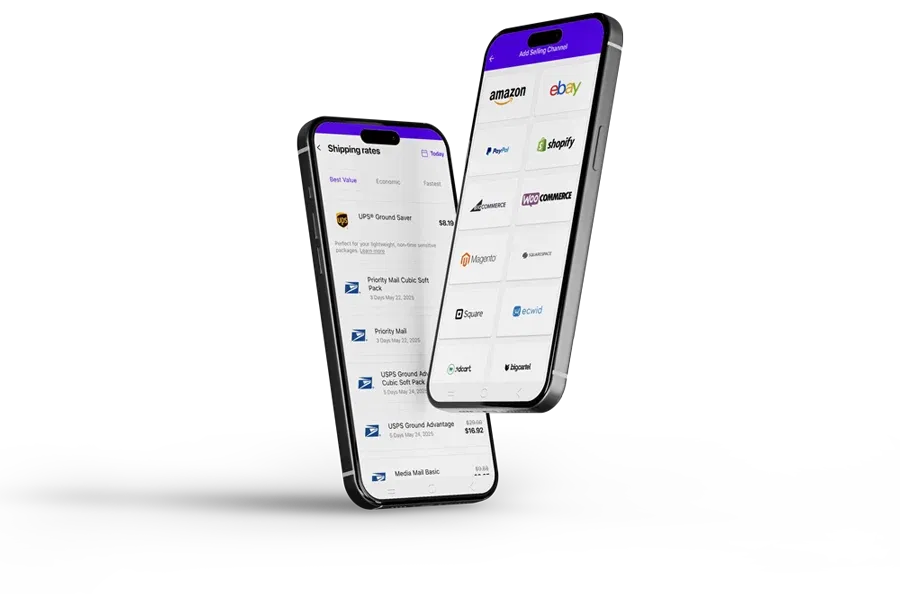
Version 1.32 cuts double status work. Mark an order as shipped in Rollo Ship. That status now syncs back to your marketplace.
Pending order lists also refresh on their own. On the web, you can see who changed an order. Each fix removes one manual check.
Mark as Shipped now syncs to your marketplace (web and app)
What it does: marking an order shipped updates your marketplace.
What it saves: a second login to change one status. One status change now covers two systems.
New to syncing? First, connect your selling channels to Rollo Ship.
Order lists refresh while shipments are pending (web and app)
What it does: lists update on their own while shipments are pending.
What it saves: fewer manual refreshes to see what moved.
See who changed an order (web only)
What it does: order update history shows who changed what.
What it saves: guesswork when several people handle orders. Check it on the web before you reship or refund.
What Else Makes Everyday Shipping Quicker in 1.32?

Three smaller changes save repeat taps. Trusted login works on your trusted devices. You can start a shipment from a saved contact.
Unlocking a Rollo Rewards badge now triggers an alert. Each one trims a daily step.
Trusted login on your devices (web and app)
Trusted login works on devices you trust. That helps if you switch between laptop and phone.
Create a shipment from Contacts (web and app)
Ship to a repeat recipient straight from Contacts. Skip retyping the address. That suits wholesale buyers, returns and repeat customers.

Rewards badge alerts (web and app)
Unlock a badge and you get notified. Badges are part of Rollo Rewards. That program launched in 1.30.
What Changed in the Rollo Ship Mobile App Setup?

Two updates are app-only. Version 1.31 improved the printer connection flow.
Version 1.32 adds more notification controls. You pick alerts for delivery updates and order imports. Both arrive when you update the app.
An improved printer connection flow (1.31, app only)
The in-app printer connection flow was improved.
More control over delivery and import alerts (1.32, app only)
Choose which alerts reach your phone:
- Delivery updates for your shipments.
- Order imports from connected stores.
Turn on what helps. Mute what doesn’t.
Which Rollo Ship Features Are on Web, App or Both?

Most new features work on web and app. Two are web-only. Unified Search and order update history live there.
Apple Pay, Google Pay and printer setup are app-only. So are the new alert controls.
Use the table to pick the right screen. It also flags the app-only items.
Rollo Ship 1.31 and 1.32 availability table
| Feature | Version | Web | App |
|---|---|---|---|
| Apple Pay and Google Pay | 1.31 | — | Yes |
| Improved printer connection flow | 1.31 | — | Yes |
| Trusted login | 1.32 | Yes | Yes |
| Order lists refresh while pending | 1.32 | Yes | Yes |
| Unified Search (Orders and Shipped) | 1.32 | Yes | — |
| Order update history | 1.32 | Yes | — |
| Mark as Shipped syncs to marketplace | 1.32 | Yes | Yes |
| Delivery and order-import alert controls | 1.32 | — | Yes |
| Create a shipment from Contacts | 1.32 | Yes | Yes |
| Rewards badge alerts | 1.32 | Yes | Yes |
A simple rule: web for search, app for setup
- Use the web for Unified Search and order history.
- Use the app for payments, printer setup and alerts.
- Most other features work on both.
Both releases also include bug fixes. Performance improved too.
How Do You Get the New Rollo Ship Features?
Update the Rollo Ship app from the App Store. Android users update from Google Play. Web features are already live at ship.rollo.com.
New to Rollo Ship? A free account takes minutes.
There’s no monthly subscription. Carrier postage still applies to each label.
Ready to drop a few manual steps?
Without these updates, small tasks pile up. Statuses get changed twice. Lists get refreshed by hand.
Order numbers get retyped into messages. Each step is minor. Together they slow every shipping day.
Rollo Ship brings those steps into one shipping platform. It runs on web, iOS and Android. It covers USPS, UPS®, FedEx, Canada Post and Purolator.
Rated 4.8 on Capterra. Used by 500,000+ users across the US and Canada.
Rollo Ship · Free multi-carrier shipping software
Stop updating the same order twice.
Mark as Shipped syncs back to your marketplace. Pay with Apple Pay or Google Pay in the app. Free to start; carrier postage still applies.
Update the app for app-only features
- Open the App Store or Google Play.
- Search for Rollo.
- Tap Update.
Update Rollo Ship today. Use the App Store or Google Play.
Use the web for search and order history
Unified Search and order update history run in your browser. Just log in on the web.
Start free if you’re new to Rollo Ship
Create your free Rollo Ship account today.
Free to start means a free account. There’s no monthly subscription. Your first 200 label-service fees are waived.
After that, the fee is generally 5¢ per label. Rollo Rewards can lower it to 1¢. Carrier postage still applies.
You pay postage to the carrier. Rollo Ship works with any printer, including Rollo printers.
Who This Is NOT For
- Readers looking for the Rewards launch. That arrived with the 1.30 release.
- Anyone expecting pricing or postage changes. The release list includes none.
- Shippers outside the US and Canada. Rollo Ship needs a US or Canadian ship-from address.
FAQs
Is the Rollo Ship app free to download?
Yes. The Rollo Ship app is free on both stores. Creating an account is free too. There’s no monthly subscription. You pay carrier postage for each label. A small per-label fee starts after your first 200 labels. Rollo Rewards can lower it.
Do Apple Pay or Google Pay change label fees or postage?
No. Apple Pay and Google Pay are just payment options. They arrived in version 1.31 for the mobile app. Postage is still paid to the carrier. The per-label service fee stays the same. Choose whichever payment method suits you on your phone.
Do these updates change Rollo Ship pricing?
No. The 1.31 and 1.32 release list includes no pricing changes. Rollo Ship stays free to start, with no monthly subscription. Your first 200 label-service fees are waived. After that, the fee is generally 5¢ per label. Rollo Rewards can bring it down to 1¢. Carrier postage still applies.
How do I update to the latest Rollo Ship version?
On iPhone, open the App Store. Search for Rollo. On Android, open Google Play and do the same. Tap Update if it appears. The web version updates on its own. Just log in to Rollo Ship in your browser.
Why can’t I find Unified Search in the Rollo Ship app?
Unified Search is web-only. It arrived in version 1.32. Log in to Rollo Ship in your browser. One search then covers your Orders and Shipped tabs. Order update history is also web-only. The app still has improved shipment search with quick copy.
Does marking an order shipped update my marketplace?
Yes, since version 1.32. Mark an order as shipped in Rollo Ship. The status syncs back. Your connected marketplace sees the change without a second login. This works on web and app.
Get More Done With Each Shipping Day
These updates are live now. Fewer steps sit between an order and its label.
Rollo Ship is a free multi-carrier shipping platform. It serves US and Canadian shippers.
It compares USPS, UPS®, FedEx, Canada Post and Purolator. FedEx and Purolator use your own account.
Rollo Ship · Web, iOS and Android
One platform for orders, labels and status updates.
Compare carriers, print labels and sync orders in one place. Free to start; carrier postage still applies.

Ship your next order with Rollo Ship — free to start.


