
TL;DR: Best Buy shipping and marketplace fulfillment costs include more than seller fees—they also shift with package dimensions, carrier choice, and service level. If your quoted shipping keeps missing the real label cost, the main issue is usually weak cost visibility at the moment you need to compare options and buy fast.
You price the order, print the packing slip, and then the real shipping bill shows up higher than expected. Best Buy Marketplace fulfillment costs can drift fast when box size, carrier choice, and service level are not fully built into the decision.
That is where a lot of sellers start losing margin without seeing it early enough to fix it. The problem is usually not one fee. It is a mix of shipping label costs, dimensional weight, and a workflow that makes comparison harder than it should be.
Once you can see what is driving the cost, the next shipping decision gets a lot easier.
Here’s What We’ll Cover
Why do Best Buy Marketplace fulfillment costs drift in the first place?

Best Buy Marketplace fulfillment costs often drift because the shipping charge you show a customer is not always based on the same inputs the carrier uses to price the label. The gap usually appears when package details, carrier choice, or delivery speed are decided too late.
The difference between a shipping charge and the real fulfillment cost
A customer-facing shipping charge is just one part of the picture. Your real fulfillment cost may also include:
- the final label price
- the box or mailer you used
- the service level needed for the order
- the extra cost of a larger package
- the time pressure created by marketplace expectations
That is why an order can look fine on paper and still feel disappointing once it is ready to ship.
Why listing-time estimates break at label purchase
The biggest issue is timing. Sellers often decide what to charge before they have the final package details in front of them.
A few small changes can throw off the math:
- a larger box than expected
- extra padding
- a faster service level
- a carrier switch
- a different ship zone than you assumed
Where cost drift usually starts
In most cases, cost drift starts when you quote shipping with incomplete information. If the package dimensions, actual weight, and carrier options are not part of the decision early enough, the label becomes the moment where the real cost finally shows up.
That is not a budgeting problem. It is usually a visibility problem.
What should you check before you compare rates and buy a label?

Before you compare rates and buy a label, make sure you know the package dimensions, actual weight, service level you truly need, and the real carrier options for that specific shipment. That short review can prevent a lot of expensive guesswork.
A five-point pre-label review
Use this quick check before you purchase any label:
- Measure the box
- Do not guess.
- Package dimensions can change the real cost more than many sellers expect.
- Weigh the final packed order
- Weigh the shipment after inserts, padding, and tape.
- Actual weight matters, even when the item itself seems simple.
- Confirm the delivery speed
- Fast is not always necessary.
- A slower service may still meet the order need without raising label spend.
- Compare carrier options
- Do not default to the same carrier every time.
- Carrier rate comparison can uncover a better fit for that package.
- Check for packaging changes
- If the order needed a different box, redo the math.
- Small packaging changes often create the biggest surprises.
What to double-check when packaging changes
If you swap a box at the last minute, revisit:
- box size
- total packed weight
- service-level need
- carrier choice
- shipping charge vs real label cost
This is one place where Rollo Ship can help. When you already know your package details, seeing rate options and moving straight into label purchase in one workflow can make cost checks faster and easier to repeat.
When a slower service level may still work
Not every order needs the fastest option on the screen. In some cases, the smartest move is the service that still fits the order while protecting margin.
A useful rule of thumb is simple: buy the speed you need, not the speed that looks safest in a rushed moment.
Why do some Best Buy Marketplace orders cost more to ship than expected?

Some Best Buy Marketplace orders cost more to ship than expected because the quoted shipping charge does not always reflect the final carrier bill. Once the box, zone, or service level changes, the order can lose margin faster than you expected.
Flat customer shipping charges vs real carrier bills
A flat customer shipping charge can look clean and easy. The problem is that the carrier does not price every shipment the same way.
Your customer may see one shipping number. You may be dealing with:
- a different box than planned
- a package that bills by size, not just weight
- a service-level upgrade
- a more expensive carrier match for that shipment
That difference is where hidden shipping costs show up.
Why “profitable on paper” can still turn thin
An order can seem healthy when you enter it. Then you pack it, weigh it, compare the label options, and realize the margin is much tighter than expected.
That usually happens when one of these costs was missing from the earlier decision:
- true billable weight
- package dimensions
- final carrier fit
- realistic delivery speed
- packaging consistency
A simple example of margin drift
Imagine an item that is light but awkward. It needs a bigger box than expected, plus filler to protect it. The product weight barely changes, but the package profile does.
That one shift may change the label cost enough to make the order feel worse than it looked at checkout. Sellers often call this a shipping surprise, but it is really a packaging and workflow surprise.
How do package dimensions, carrier choice, and service level change the real cost?

The real cost changes when the box gets larger, the carrier changes, or the service level moves faster. Even if the item weight stays similar, those variables can shift the final label enough to change which option actually makes sense.
Actual weight vs billable weight
Actual weight is what the package weighs on the scale, but billable weight is what the carrier may use to price the shipment—so it helps to understand how to calculate billable weight before you compare rates.
Those are not always the same thing.
| Factor | What it means | Why it changes cost |
|---|---|---|
| Actual weight | The packed shipment on a scale | Heavier shipments usually cost more |
| Package dimensions | The size of the final box | Larger boxes can raise the bill |
| Billable weight | The weight used for pricing | May be based on size, not just scale weight |
| Service level | How fast the shipment moves | Faster options usually cost more |
| Carrier choice | Which service you use | One carrier may fit the shipment better than another |
Why bulky but light items get expensive fast
This is where dimensional weight becomes a real issue. A shipment may not weigh much, but if the box is large, the carrier may treat it like a bigger-cost package anyway.
That often affects sellers with:
- light but awkward products
- extra protective packaging
- inconsistent box choices
- orders that “grew” during packing
Cheapest, fastest, or best fit for the order?
The lowest rate is not always the best answer. The fastest rate is not always necessary either.
A better way to think about it is:
- Cheapest if timing allows and the package profile fits
- Fastest if the order truly needs speed
- Best fit when you are balancing cost, timing, and packaging reality
The goal is not to win on one label. It is to get to more predictable fulfillment costs over time.
Where does workflow friction quietly raise fulfillment costs?

Workflow friction raises fulfillment costs when sellers compare rates in one place, buy labels somewhere else, and print in a separate step. That slows the process, hides tradeoffs, and makes rushed decisions more likely.
What platform shipping friction looks like day to day
It usually does not feel dramatic. It feels annoying.
You bounce between tabs, re-enter details, double-check package sizes, and rush to pick a label before the order queue grows. That friction can create:
- weaker carrier decisions
- missed cheaper options
- more label errors
- slower order processing
- less confidence in the final choice
Why tab-switching hurts speed and cost visibility
Every extra step creates a chance to lose context. If you compare rates in one place but print elsewhere, it becomes harder to see the tradeoff clearly in the moment.
That matters when you are trying to answer a practical question fast:
- Should I keep this box?
- Should I switch carriers?
- Do I really need this service level?
- Am I overpaying for this label?
What a compare-buy-print workflow changes
A cleaner workflow does not just save time. It can also reduce the risk of expensive decisions.
This is where Rollo Ship fits naturally. When rate comparison and label creation live in one place, it becomes easier to move from package details to a real choice without adding more tab chaos. That can mean better cost visibility, fewer surprise fees, and a smoother order flow.
What kind of shipping setup helps Best Buy Marketplace sellers stay in control?

A shipping setup stays useful when it makes package inputs clear, carrier comparison fast, and label decisions easy to repeat. You do not need a giant operations stack. You need a workflow that lowers guesswork and keeps orders moving.
The minimum workflow a seller should be able to repeat
A workable setup should let you do these things consistently:
- measure the final package
- weigh the packed order
- compare carrier options
- choose the right service level
- buy and print the label without breaking the flow
That is the baseline. If one of those steps feels clumsy every time, your setup may be creating more cost pressure than you realize.
Make label printing one less thing to think about
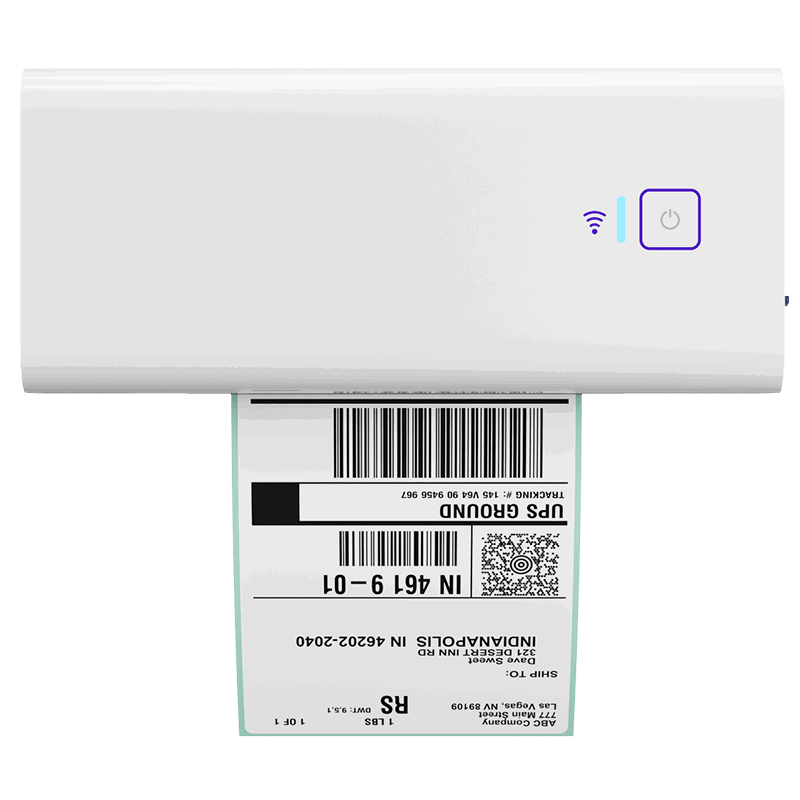
When your shipping setup is easy to repeat, it gets easier to move from packed order to printed label without extra friction. The Rollo Wireless Printer helps sellers create a cleaner, faster shipping station without relying on ink or a more complicated setup.
Signs your setup is too limited for marketplace expectations
Watch for these warning signs:
- you default to one carrier because it is familiar
- you rarely compare rates
- box changes keep surprising your shipping math
- label decisions feel rushed
- you are never fully sure you picked the best option
What “organized enough” looks like before volume grows
You do not need heavy automation to get better results. Often, sellers just need:
- clearer package data
- better carrier rate comparison
- fewer disconnected steps
- a repeatable label flow
That is another reason Rollo Ship can make sense here. It helps create a low-chaos workflow for sellers who want more control without building something complicated.
When does a multi-carrier workflow become worth it?

A multi-carrier workflow becomes worth it when packaging varies, shipping costs feel inconsistent, or manual comparison takes too much time—and a stronger multi-carrier rate comparison process can make those decisions easier to repeat. The goal is not to add more software. It is to make good shipping decisions easier to repeat.
Signs you may be paying a platform tax
This does not always show up as an obvious fee. Sometimes it looks more like a habit.
You may be paying a platform tax when:
- you buy labels the same way every time without comparing
- you accept higher label spend to avoid extra steps
- your workflow hides cheaper or better-fit options
- you feel stuck with one shipping path because it is familiar
When rate comparison saves more than it complicates
A multi-carrier workflow usually becomes useful when:
- your package sizes vary
- your service-level needs change order to order
- you want lower label spend
- you are tired of guessing which carrier fits best
- small savings per label start adding up
This is the strongest point where Rollo Ship becomes practical. If you want cost visibility before purchase, plus a faster compare-buy-print flow, it can reduce the friction that causes expensive choices.
Fastest vs cheapest is not always the smartest choice
The better question is not “What is the lowest rate?” It is “What is the right rate for this order?”
That may mean:
- paying a little more for the best fit
- choosing a slower option when it still works
- avoiding a box choice that makes the cheapest rate disappear
- comparing carriers before you commit, not after
Compare rates and buy labels with less guesswork
If fulfillment costs keep changing at the last minute, a clearer shipping workflow can make a big difference. Rollo Ship helps you compare carrier options, choose the best fit for the order, and move into label purchase faster.

Final Words
Best Buy Marketplace fulfillment costs get harder to manage when shipping decisions happen too late or with incomplete package details. The good news is that most of the biggest surprises come from a few fixable issues: box size, service level, carrier choice, and workflow friction. Once you make those factors visible before you buy the label, it becomes much easier to protect margin and ship with confidence. A cleaner process does not just save money. It also makes daily fulfillment feel more predictable, faster, and easier to control.
Follow Rollo on:
Frequently Asked Questions About Best Buy Marketplace fulfillment costs
📌 Q: How do I handle Best Buy Marketplace fulfillment costs without overcomplicating my workflow?
💭 A: Start with the basics that affect real label cost: package dimensions, actual weight, delivery speed, and carrier options. Most sellers do not need a more complex system first. They need a more visible one.
📌 Q: Why is my shipping quote lower than what I actually pay?
💭 A: The original quote may not include the final box size, billable weight, or service level needed for that shipment. The gap usually appears when it is time to buy the label.
📌 Q: What usually makes Best Buy Marketplace fulfillment costs go up?
💭 A: The biggest drivers are package dimensions, carrier choice, service speed, and workflow choices that hide better options until too late. In many cases, the cost problem is a mix of inputs, not one fee.
📌 Q: How do package dimensions affect my real shipping cost?
💭 A: Package dimensions matter because some shipments may be priced by billable size instead of scale weight. That is why bulky but light orders can become more expensive than expected.
📌 Q: How do I know if I’m overpaying for shipping labels on Best Buy Marketplace?
💭 A: may be overpaying if you rarely compare carriers, use inconsistent packaging, or move through a fragmented workflow that makes rate shopping harder than it should be.
📌 Q: What kind of shipping setup works best for Best Buy Marketplace sellers?
💭 A: The best setup is one that makes measuring, comparing, and printing easy to repeat. The goal is not more tools. It is fewer surprises and better cost control.
📌 Q: When should I switch from a platform-only workflow to a multi-carrier shipping app?
💭 A: It often becomes worth it when packaging varies, shipping costs feel inconsistent, or rate comparison starts saving enough to matter. A better workflow also helps when manual steps are slowing you down.
📌 Q: Does comparing carriers add too much complexity?
💭 A: can if the process is fragmented. It usually reduces complexity when comparison, purchase, and label creation happen in one clear flow.


