
TL;DR: Custom sticker labels are personalized adhesive designs used to brand, organize, or ship products. Available in paper, vinyl, or thermal materials, they can be printed in-house or ordered professionally. For e-commerce sellers, custom sticker labels improve packaging efficiency, enhance brand identity, and support eco-friendly shipping workflows.
You’re standing in line at the post office, arms full of packages. As you shift the boxes, a blur of motion streaks past—a skateboard clatters, a security guard yells, and the kid slaps a bright sticker onto the nearest blue mailbox before disappearing down the street. It’s quick, rebellious, unforgettable. You glance at that sticker—bold design, sharp logo—and think: that brand just stuck with me. What if your packaging could do the same? In this guide, you’ll learn how to make custom sticker labels like a pro—turning every box you ship into a branded moment customers can’t forget.
Skip Ahead to a Topic
What are custom sticker labels and why do they matter?

Custom sticker labels are adhesive prints—logo, design, or message—formatted as roll labels, sheets, or singles to fit your packaging. They turn plain paper bags, envelopes, and boxes into brand touchpoints, cut packing time, and make unboxing memorable without adding complicated steps or cost. According to Towards Packaging, the personalized stickers market is projected to grow from USD 4.58 billion in 2024 to USD 7.99 billion by 2034—a steady 5.73 % CAGR that highlights how custom labeling continues to drive brand visibility and e-commerce growth.
The Main Jobs Custom Labels Handle for Businesses
Custom labels do three big jobs They brand your products with a consistent look. They keep your operation organized with barcodes, SKUs, and promotion stickers. And they help you move faster during rush weeks, when speed and compact storage for labels and dispensers really matter.
Where Custom Sticker Labels Work Best
Common surfaces: shipping boxes, mailers, bottles, jars, laptops, paper bags, pouches, and envelopes. Formats: die-cut singles for giveaways, roll for label applicators, and sheet for low-volume printing. Discover 7 ways personalized labels can elevate your packaging and turn every delivery into a brand experience.
Brand moment: Add a small personalized sticker (thank-you seal or QR to your website) on the flap. It’s simple, it’s custom, and customers love it.
What materials and finishes work best for your use case?

Paper is affordable and easy to write on, vinyl and BOPP are waterproof and durable, and direct-thermal stock is fast and ink-free for in-house printing. Choose finish—matte, gloss, foil, clear, or white—based on look, handling, and expected moisture or oils exposure.
Choosing the Right Label Material for Your Product
Paper is affordable and easy to write on, vinyl and BOPP are waterproof and durable, and direct-thermal stock is fast and ink-free for in-house printing. Choose finish—matte, gloss, foil, clear, or white—based on look, handling, and expected moisture or oils exposure.
- 🧾 Paper (matte/gloss/foil) — Best for cost control and a warm, tactile feel. Great on paper bags and envelopes. Not ideal for heavy moisture.
- 💪 Vinyl / BOPP (clear/silver/white) — Tough, scuff-resistant, and waterproof. Ideal for bottles, jars, and products that see oils or condensation.
- ⚡ Direct-thermal — Monochrome but high-contrast and fast. Perfect for operational labels like SKUs, barcodes, “Fragile,” and simple branding where color doesn’t matter.
Selecting the Perfect Finish to Match Your Brand Style
Each material has its own strengths, depending on how your labels will be handled, stored, and displayed. Here’s how paper, vinyl, and direct-thermal options compare when balancing cost, durability, and finish quality.
- 🎨 Matte: Anti-glare, premium look, great for scanability.
- ✨ Gloss: Punchy, high-shine finish that makes bright artwork pop.
- 🪙 Foil / Metallic (silver or gold): Eye-catching, premium feature for limited runs and special editions.
- 🧴 Clear: Lets the product show through—perfect for transparent bottles and minimalist branding.
Pro tip: Match surface and adhesive. Corrugate needs strong tack; glass prefers removable or permanent depending on reuse. If you see peeling, clean and dry the surface, then increase pressure on application.
How do you design custom labels that look pro—without a designer?

Start with your logo, colors, and one message. Keep type large, lines clean, and contrast high. Choose the right shape and size for the container. Always upload high-resolution art and request a proof to ensure the final printed label matches what you saw on screen.
Design Principles That Make Your Labels Look Professional
Before you dive into colors and fonts, get your basics right. A clean layout makes even a small batch of custom sticker labels look like it came from a high-end packaging studio.
- 🧭 Hierarchy: Logo first, then product name, then essentials (scent, size, ingredients).
- 🔲 Shape: Circles for lids, rectangles for boxes, ovals for jars; die-cut for a unique outline.
- 🔠 Type: Sans-serif for small text; minimum 7–8 pt on paper, 9–10 pt on glossy.
- 🎨 Contrast: White on clear or dark on light to avoid fading.
- 🧾 File prep: 300 DPI, CMYK (if outsourcing), bleed included, text outlined.
Smart Workflow Tips to Avoid Costly Reprints
Once your design looks great, test it like a pro. A few smart steps before printing can save you hours of rework and prevent wasted sheets or rolls.
- 🖼️ Upload your art to a simple editor with live preview.
- 🧩 Use built-in templates sized for common items (4×6, 3×2, 2×1).
- 🧾 Run a 1-label test print before placing a big order.
For more clever layout and printing shortcuts, check out these custom label printing hacks that save time and materials without sacrificing quality.
Brand opportunity: Use a tiny personalized sticker as a “thank you” on envelopes or tissue. Your customers will remember the difference.
Design Custom Labels Free with Rollo Label Design
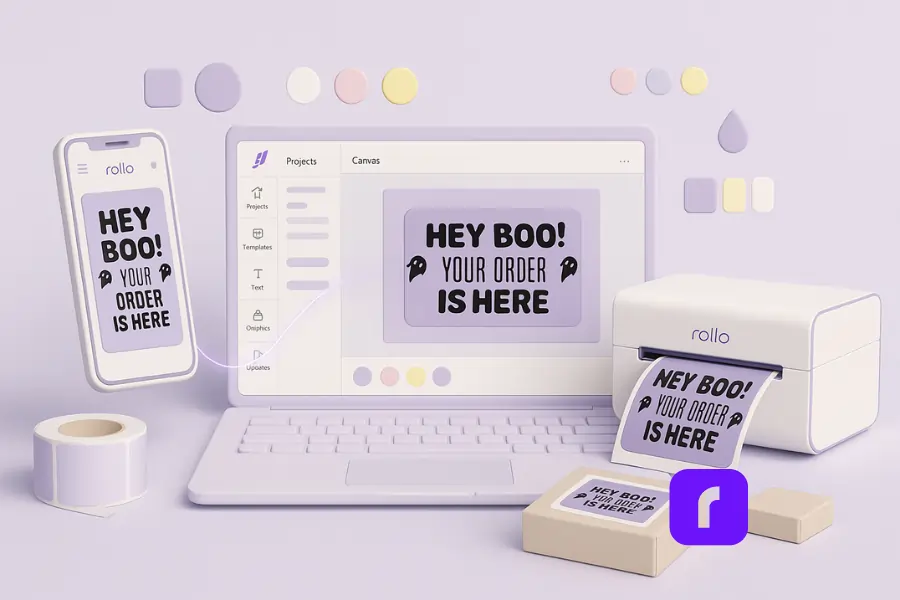
Creating professional custom sticker labels doesn’t have to be complicated or costly. The free Rollo Label Design App makes it easy to design, customize, and print labels on any device—with no design background required.
Why You’ll Love It
- 🎨 Beginner-friendly: Start fast with 500+ free templates and thousands of icons.
- 💸 Completely free: No watermarks, no subscriptions, and no hidden fees.
- 🖨️ Print-ready: No resizing or cropping—labels print perfectly on your Rollo Wireless Printer.
- 🔄 Fully customizable: Upload your logo, add QR codes or barcodes, and adjust every element.
- 🌐 Works anywhere: Use it on desktop, iOS, or Android to create labels on the go.
How It Fits Into Your Workflow
The app integrates seamlessly with your existing Rollo setup for fast, efficient branding and shipping.
- 🧠 Design: Start from a ready-made template or a blank canvas.
- ✏️ Customize: Add your logo, product info, or promotional details.
- 🚀 Print: Send directly to your Rollo printer—no resizing or software headaches.
💡 Pro Tip: Pair the Rollo Label Design App with Rollo Ship for a complete all-in-one solution—design, print, and ship from a single ecosystem.
🎨 Design Custom Labels Free with the Rollo Label Design App
Create professional, eye-catching labels on any device — no design skills needed.
Pair it with your Rollo printer to:
- 💡 Customize 500+ free templates & icons
- 🖋️ Upload logos, barcodes, and QR codes
- 🚀 Print perfectly sized labels — no cropping, no stress
Can you really print personalized sticker labels at home like a pro?

Yes. You can print excellent custom stickers with inkjet, laser, or thermal printers. Thermal printers—like the Rollo Wireless Label Printer—offer crisp, ink-free output, fast batch runs, and low mess. They’re ideal for roll labels, barcodes, and simple branding.
Comparing Inkjet, Laser, and Thermal Printers
Each printer type has its own sweet spot for printing custom sticker labels. Knowing which one to use can save time, money, and frustration—especially if you’re balancing color needs, speed, and volume.
- 🖨️ Inkjet: Best for vibrant color and smooth gradients. Watch for smearing on glossy surfaces.
- 📄 Laser: Produces sharp, crisp text; toner handles moisture better than inkjet.
- ⚡ Thermal: Monochrome and speed-first. Perfect for everyday labels like SKUs, “Thank You,” promotion seals, and shipping.
Setting Up Your Rollo Printer for Custom Labels
If you’re using a Rollo Wireless Printer, setup only takes a few minutes. The key is choosing the right media, calibrating once, and maintaining the printhead for crisp, consistent results.
- 🧻 Select compatible roll media (gapped or black-mark).
- ⚙️ Calibrate once. Check print density and alignment for accuracy.
- 🧼 Clean weekly. Keep a soft cloth handy to wipe dust from the printhead each week.
When It’s Better to Outsource Your Label Printing
Even the best in-house setup has limits. Some projects—like full-color, high-volume, or specialty finishes—are best left to professional print shops for perfect registration and finish consistency.
- 🎨 Full-bleed color on laminated vinyl or metallic foil.
- 🏷️ Large retail runs with strict color targets or tight turnaround.
- ✂️ Complex die-cut shapes you’ll reorder each season.
If you’re running an online store, these label printing tips for online sellers can help you level up your workflow.
Smart mix: Print operational labels in-house for speed and cost control. Outsource premium, full-color stickers for big promotion pushes.
🖨️ Streamline Your Shipping with the Rollo Wireless Printer
Print sharp, professional shipping labels instantly—no ink, no cables, no hassle.
Pair it with Rollo Ship to:
- ⏱️ Save time on every shipment
- ⚡ Print labels & packing slips in seconds
- 📦 Simplify tracking numbers for every order
How do you apply labels without bubbles, crooked edges, or peeling?

Prep the surface first. Wipe dust and oils, dry fully, then apply from one edge with steady pressure. For volume or curved bottles, use label applicators or dispensers—they deliver cleaner placement, fewer rejects, and consistent results across your line.
Essential Steps for Smooth Label Application
Applying labels isn’t just peel-and-stick. A few prep steps make the difference between a flawless finish and one that peels a week later. These quick actions ensure your labels stay aligned, bubble-free, and long-lasting.
- 🧽 Clean: Use isopropyl on glass and plastics; dry before sticking.
- 📏 Align: Mark a guide line with a light pencil or jig.
- 🤲 Pressure: Apply firm, even pressure; burnish edges to secure adhesion.
- ⏳ Cure: Let the adhesive set before packing to avoid lift or curling.
Helpful Tools That Make Application Faster and Easier
From small-batch makers to growing e-commerce teams, a few simple tools can make label application cleaner, faster, and more consistent—especially for curved bottles or high-volume packaging lines.
- ⚙️ Label applicators: Most models support roll labels and allow quick size adjustments.
- 🧭 Tabletop dispensers: Keep labels moving smoothly for a two-person team.
- 🪞 Squeegees and rollers: Perfect for clear film or delicate materials to eliminate trapped air.
Troubleshooting: If you see peeling on corrugate, switch to stronger adhesive or move to a flat zone. On glass with moisture, choose waterproof film or over-laminate.
How much do custom sticker labels cost—and what should you order?

Expect ~$0.02 per direct-thermal label and $0.10–$0.20 for premium vinyl at volume. In-house printing cuts ink and setup fees. For growing shops, start small, track reordering cadence, and keep extras in compact storage to avoid waste or color drift over the years.
Cost snapshot (typical ranges)
| Format | Use Case | Est. Unit Cost | Notes |
|---|---|---|---|
| Direct-thermal (monochrome) | SKUs, simple branding | $0.02–$0.05 | No ink, fast, everyday use |
| Paper sheet (inkjet/laser) | Low-volume color | $0.05–$0.12 | Watch for smears/ misfeeds |
| Vinyl/BOPP roll (outsourced) | Premium full-color | $0.10–$0.20 | Durable, waterproof finishes |
| Foil/metallic | Limited promotion | $0.15–$0.30 | Premium feature look |
How much roll labels should I order?
- 🆕 New design? Start with a small run and reorder once you confirm demand.
- 🎨 Seasonal art? Batch labels by month or week to prevent fading and reduce hard storage.
- ♻️ Evergreen seals? Keep a master roll in a sealed bag for compact storage and longevity.
Rollo note: If you’re printing daily operational labels, a thermal workflow keeps per-label costs predictable and fast—no cartridges, less mess, easy reordering.
🚀 Ship Smarter with the Rollo Ship App
Simplify fulfillment and cut costs with powerful, automated shipping tools.
Connect your store and ship instantly at discounted rates.
- 💸 Access deep USPS & UPS discounts
- 📦 Sync orders from Shopify, eBay, Etsy, and more
- ⚡ Print shipping labels and tracking in one click
Are custom sticker labels eco-friendly—or just marketing?

Eco options exist and they’re improving. Look for FSC-certified paper, BPA-free coatings, and recyclable liners. Vinyl is tough but less green; direct-thermal avoids ink waste yet isn’t compostable. Choose what’s ideal for your product, your customers, and your values—it’s not one-size-fits-all.
Greener Label Choices That Still Feel Premium
Eco-friendly doesn’t have to mean plain or fragile. Many sustainable label materials now balance responsible sourcing with the durability and visual quality customers expect from premium packaging.
- 🌿 FSC-certified paper: Responsibly sourced fibers; ideal for paper bags and boxes.
- 🧴 BPA-free thermal: Cleaner handling and a better customer story.
- 📦 Right-sized orders: Print only what you need—less waste, easier compact storage.
Balancing Waterproof Performance with Sustainability
Sometimes, your labels need to survive moisture or oils. The key is choosing waterproof options only where they truly add value—without compromising recyclability or cost.
- 💧 BOPP or laminated paper: Ideal for bottles, jars, or anything exposed to moisture.
- ✉️ Matte paper: Works beautifully for dry goods or envelopes, offering a smooth white finish that still recycles well.
What’s the best way to choose the right label—fast?

Start with the job: branding, organization, or shipping. Pick materials based on surface and moisture. Then match shape and size to the container. If you print daily, go thermal. If the label sells the product on a shelf, go premium color with vinyl or foil.
Quick selection checklist for personalized labels
Choosing the right label depends on what you’re creating and how it’ll be used. Start with the job—branding, organization, or shipping—then match materials, finish, and printer type to your workflow. If you print daily, go thermal; if your label sells the product, invest in color with vinyl or foil.
- 🎯 Purpose: Branding, SKU, instruction, promotion, or shipping?
- 📦 Container: Bottles, boxes, jars, mailers—flat or curved?
- 🌤️ Environment: Exposure to oils, moisture, or sunlight?
- ✨ Finish: Matte, gloss, clear, white, silver, or foil?
- 🖨️ Print method: In-house (thermal, inkjet, laser) or outsource?
- 📅 Volume: Daily runs vs. seasonal drops; plan reordering accordingly.
Final Words
Creating professional custom sticker labels doesn’t have to be complicated. With the right materials, a thoughtful design, and a simple print setup, you can turn ordinary packaging into a powerful extension of your brand. Every label that leaves your desk tells a story—of quality, consistency, and care.
Whether you’re sealing a shipment, branding your first product line, or adding a personalized touch to customer orders, smart label design helps your business stand out long after the box arrives.
Follow Rollo on:
Frequently Asked Questions About Pay-Per-Label Shipping Apps
📌 Q: Can I make custom labels with a thermal printer?
💭 A: Yes. Thermal is perfect for monochrome labels: SKUs, branding marks, and “thank you” seals. It’s fast, clean, and ideal for compact storage and everyday application.
📌 Q: What label material is best for waterproof durability?
💭 A: Choose vinyl or BOPP. They resist oils, splashes, and moisture. For paper, add a laminate. That extra layer prevents fading and edge peeling.
📌 Q: Are roll labels better than sheets for volume?
💭 A: For speed, yes. Roll labels work with dispensers and most label applicators, reduce handling, and keep your line moving. Sheets are fine for small runs.
📌 Q: How can I avoid crooked placement by hand?
💭 A: Use a simple guide and apply from one edge, smoothing as you go. On curved bottles, a small label applicator makes a huge difference.
📌 Q: Where should I put stickers on packaging for the best effect?
💭 A: Place near the opening so customers see it first. On shipping boxes, use the flap; on paper bags, center the top; on envelopes, place it across the seal.
📌 Q: Do eco-friendly labels mean lower print quality?
💭 A: Not if you choose the right materials. FSC paper with a matte finish looks premium and prints crisp type. Store in a cool, dry spot and rotate stock each week.
📌 Q: What if my labels keep peeling?
💭 A: Clean the surface, switch to stronger adhesive, and increase application pressure. If humidity’s high, move to waterproof film or change the surface zone.
📌 Q: Can I include a QR code without it looking clunky?
💭 A: Yes—keep it small and high-contrast. Tuck it near the logo or in a corner with “Scan for care tips.” Test the scan after printing.


