
TL;DR: Best Buy Marketplace shipping compliance means building a workflow that keeps shipment timing, tracking, labels, and order updates accurate from the start. If you just got approved, the real risk is not the policy language itself—it is missing ship windows, creating label mistakes, or letting manual steps turn into cancellations and rework.
You got approved for Best Buy Marketplace, and now the real stress starts: keeping shipping clean enough to avoid delays, tracking mistakes, and canceled orders. Best Buy Marketplace shipping compliance stops feeling like a policy term the minute orders start coming in.
What matters now is not memorizing rules. It is building a repeatable workflow that keeps labels, tracking, timing, and service choices aligned without creating extra rework or surprise costs.
When the process is clear, it gets much easier to ship with confidence and make fewer expensive mistakes.
Here’s What You’ll Learn
What does Best Buy Marketplace shipping compliance actually mean day to day?

Best Buy Marketplace shipping compliance means running a shipping process that keeps timing, labels, tracking, and order updates accurate from the start. For most approved sellers, the challenge is not understanding the term itself. It is making sure the daily workflow is clean enough to avoid avoidable mistakes, delays, and rework.
In plain English, this is what the platform seems to care about most: orders moving on time, shipment confirmation happening promptly, tracking being accurate, returns being handled properly, and customer-facing shipping details staying consistent, as outlined in the official Best Buy Marketplace Program Policies. Best Buy’s current marketplace policies say orders are expected to ship in most cases within two business days, orders not confirmed as shipped within three business days may be canceled, and customers need an option for a prepaid return label.
That is why compliance is really a workflow issue. You are not just checking a policy box. You are trying to keep inventory, labels, tracking, and closeout steps from drifting out of sync.
A useful way to think about it is this:
- Policy language tells you what Best Buy expects.
- Workflow readiness determines whether you can meet those expectations every day.
- Shipping discipline is what keeps small misses from becoming cancellations, rework, or customer support headaches.
Some Best Buy pages also cover broader vendor logistics and Supplier Direct Fulfillment topics, so it helps to separate “what this marketplace seller workflow needs right now” from “what exists elsewhere in the partner ecosystem.”
What usually goes wrong first after you get approved?

The first problems usually show up in ship timing, shipment confirmation, tracking consistency, and order closeout. That is why Best Buy Marketplace shipping compliance can feel harder than expected at the start. The risk is rarely one big mistake. It is a few messy manual steps turning into cancellations, support issues, or rework.
Most sellers do not get tripped up because they forgot the word “compliance.” They get tripped up because the order flow gets messy under real volume.
The early weak spots usually look like this:
- Orders sit too long before the team confirms shipment
- Tracking gets entered late or inconsistently
- Inventory says one thing, but the order says another
- A partial shipment creates extra communication work
- The label gets printed before the order is truly ready
Best Buy’s own policy language highlights several of these pressure points. The company expects prompt shipment confirmation and tracking after an item is physically shipped, says false tracking or shipment confirmation can trigger immediate termination, and notes that partial shipments should be communicated through ASN while unfulfilled line items are canceled.
This is also where support friction starts. One delayed closeout can turn into “Where is my order?” messages. One partial shipment can create tracking confusion. One inventory mismatch can force a cancellation you did not want.
That is why the first goal is not “be perfect.” It is “know what breaks first so you can stabilize it fast.”
What should you set up first to keep shipping clean?

The simplest starting point is a short setup checklist: validate inventory, confirm realistic ship timing, standardize label timing, close out shipments with accurate tracking, and plan for exceptions like returns or partial shipments, especially if you are still figuring out what first-time sellers automate to keep fulfillment cleaner from the start.
A clean setup reduces the chance that small mistakes become compliance problems later.
Use this as your first post-approval shipping checklist:
- Inventory check: Make sure available inventory is accurate before orders build up.
- Ship timing check: Confirm your team can actually move orders within your normal window.
- Label timing check: Do not print labels so early that the order can still change.
- Tracking check: Make sure someone owns tracking entry and shipment confirmation.
- Exception check: Decide what happens when an item is out, split, delayed, or returned.
- Returns check: Know how prepaid return label handling works in your process.
Best Buy’s marketplace policies also add a few practical constraints worth keeping in mind. If you cannot fulfill a backordered item within three business days, the order should be canceled, and if you do not confirm shipment within three business days, Best Buy may cancel the order.
A simple setup table can help:
| Setup area | What to confirm early | Why it matters |
|---|---|---|
| Inventory | Counts are accurate | Prevents avoidable cancellations |
| Label timing | Labels print only when ready | Reduces rework and wrong-label risk |
| Tracking closeout | Process owner is clear | Helps avoid delayed shipment confirmation |
| Partial shipments | Exception path is documented | Keeps tracking and customer updates cleaner |
| Returns | Return-label flow is understood | Prevents confusion after delivery |
If you set up these basics early, the workflow usually feels a lot less fragile.
How do you build a repeatable label-to-ship workflow?

A repeatable workflow usually follows the same order every time: validate the order, confirm inventory, choose the service, print the label at the right time, ship, and close the order with accurate tracking. The goal is to make the label the result of a clean process, not the beginning of a rushed one, which is why it helps to think about shipping as a system from order to door instead of treating label printing like a separate task.
Rollo has written about this idea well: labels create problems when they are treated as the starting point instead of the result of a clean order process. Print too early and the order may change. Print too late and the team gets rushed.
Here is a simple version of the workflow to standardize:
- Validate the order
- Check the item, quantity, address, and any order notes.
- Confirm inventory before anyone touches a label.
- Choose the right service
- Pick the service based on the shipment, not habit.
- This is where carrier selection should be deliberate, not reactive.
- Print the label when the order is actually ready
- Early printing creates rework.
- Late printing creates panic.
- Ship and confirm quickly
- Once the item is physically shipped, close the loop fast.
- Best Buy expects prompt shipment confirmation and tracking after shipment.
- Handle exceptions cleanly
- If a shipment becomes partial, document how the team communicates it.
- Best Buy says partial shipments should communicate shipped product through ASN and cancel remaining unfulfilled line items.
A few rules of thumb help keep the workflow steady:
- Do not let label printing outrun order validation.
- Do not let tracking updates become an afterthought.
- Do not let exception handling live only in someone’s memory.
- Do not assume split shipments will “work themselves out.”
This is also the first place where a tool like Rollo can make sense. If your team is juggling rate comparison, label timing, and label output across repeated orders, one cleaner workflow can reduce tab chaos and help make shipping feel more predictable.
Make label printing one less thing to worry about
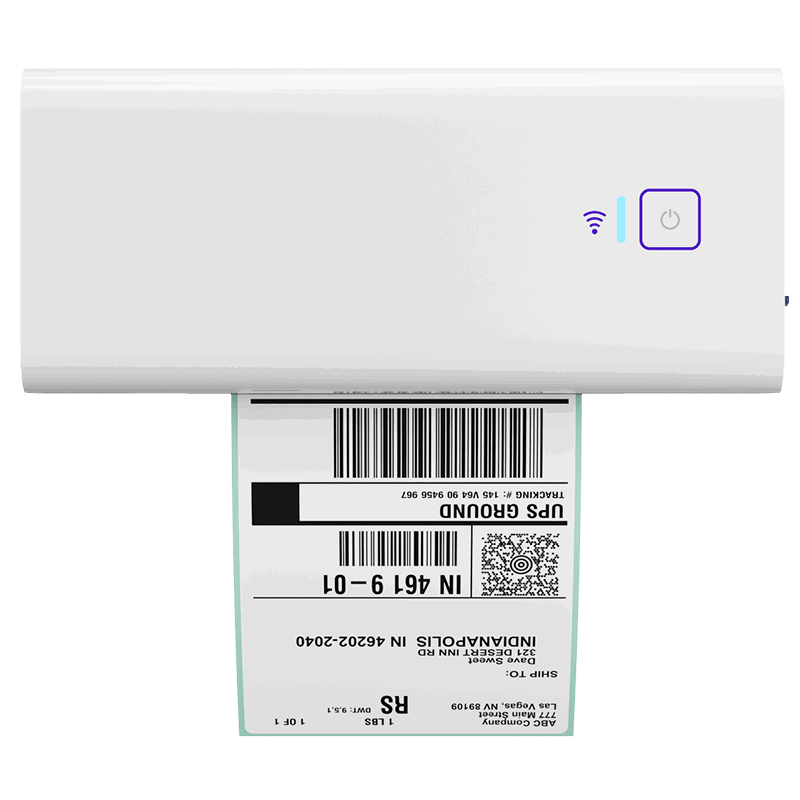
When orders start moving faster, label timing and output mistakes can create unnecessary rework. Rollo’s Wireless Printer helps make printing simpler and more consistent, so your team can keep the shipment workflow moving without added friction.
Where do shipping costs and workflow mistakes usually show up?

Most avoidable cost and error risk shows up in the messy middle of fulfillment: wrong-service choices, early label printing, tracking cleanup, partial-shipment friction, and last-minute exception handling. That is why shipping feels more expensive and stressful when the workflow is inconsistent, even before the seller notices the pattern. For sellers who want a more Best Buy-specific breakdown, looking at Best Buy Marketplace fulfillment costs can make those pressure points easier to spot.
A lot of shipping “cost” problems are really workflow problems wearing a shipping hat.
The biggest trouble spots are usually:
- Wrong-service choices that cost more than needed
- Early labels that need to be voided or redone
- Tracking cleanup after the shipment has already moved
- Partial shipments that multiply communication work
- Reactive exceptions that interrupt the whole line
Here is a quick comparison table:
| Risk point | What usually happens | Why it hurts |
|---|---|---|
| Service selection | Team picks the familiar option | Can lead to overpaying |
| Label timing | Label prints before order is final | Creates rework and confusion |
| Tracking closeout | Tracking is entered late | Increases support friction |
| Partial shipment | Order needs extra tracking or messaging | Adds manual follow-up |
| Exception handling | No standard path for split or delayed orders | Slows the whole workflow |
This is where cost visibility before label purchase becomes useful. Not because every order needs deep analysis, but because repeated “good enough” decisions can quietly pile up.
It is also a natural point to think about Rollo Ship. If your team needs better rate comparison visibility and more consistent label output, workflow clarity can reduce overpaying and cut down on preventable mistakes.
When does a multi-carrier label workflow become worth it?

A multi-carrier workflow becomes worth it when shipping decisions stop being occasional and start becoming repetitive, time-sensitive, or easy to get wrong. At that point, standardized multi-carrier rate comparison and more consistent label output help reduce both operational drag and the risk that manual steps will create preventable compliance problems.
You probably do not need a more advanced workflow on day one just because it sounds organized. You need it when the old way starts breaking.
Common signs the manual setup is starting to crack:
- You are checking rates in too many places
- Labels are getting printed out of order
- Tracking updates depend on memory
- Split or exception orders slow everything down
- The same mistakes keep coming back
This is the real decision point. A multi-carrier process is no longer just about shopping for a better rate. It becomes a way to make service selection, label creation, and shipment closeout more consistent.
If that sounds familiar, a centralized shipping dashboard may help by keeping more of the process in one place. That can be especially useful when order volume grows just enough to make the current setup feel shaky, but not enough to justify a heavy enterprise system.
What can Rollo help simplify, and what still stays on the seller?

Rollo can help simplify label-heavy, repetitive shipping work by making rate comparison, label output, and workflow consistency easier to manage. It does not replace Best Buy’s marketplace rules or seller obligations. The seller still owns compliance, but the workflow can become easier to run with fewer disconnected steps.
That distinction matters.
What Rollo can help simplify:
- Comparing rates before you buy a label
- Keeping label output more consistent
- Reducing workflow friction around repetitive shipping tasks
- Making it easier to connect shipping decisions to the order flow
What still stays on you:
- Meeting Best Buy Marketplace requirements
- Handling shipment confirmation correctly
- Managing returns and exceptions
- Keeping inventory, timing, and tracking aligned
- Following any platform-specific rules that apply to your orders
This is why Rollo fits best as workflow relief, not policy relief. If the pain is label-heavy, repetitive shipping work, the tool can help make the process easier to manage. But it is still your job to keep the workflow compliant.
Ready for a shipping workflow that scales without adding more chaos?
If your team is spending too much time on rate checks, label creation, and order handoffs, Rollo Ship can help bring those steps into one place. It is a practical next step for small teams that want more clarity, fewer repeated tasks, and a shipping process that feels easier to manage as order volume grows.

Final words
Best Buy Marketplace shipping compliance gets much easier when the workflow is simple enough to repeat under real order volume. The biggest early risks usually come from timing, labels, tracking, and exceptions, which is why a cleaner process matters before the stress turns into cancellations, rework, or extra cost.
Follow Rollo on:
Frequently Asked Questions About Best Buy Marketplace Shipping Compliance
📌 Q: What does Best Buy Marketplace shipping compliance actually mean?
💭 A: It means your shipping process needs to keep timing, labels, tracking, and order updates accurate enough to meet Best Buy’s marketplace expectations. In real life, that usually comes down to workflow discipline more than policy vocabulary.
📌 Q: happens if I do not confirm shipment quickly enough?
💭 A: Best Buy says it expects orders to ship in most cases within two business days, and if you do not confirm shipment within three business days of receiving an order, it may cancel the order. That is why shipment closeout needs a clear owner in your process.
📌 Q: What usually breaks first after approval?
💭 A: Usually it is not one major failure. It is a mix of delayed shipment confirmation, tracking gaps, inventory mismatches, and manual exception handling that starts to stack up.
📌 Q: Does Best Buy Marketplace allow partial shipments?
💭 A: Yes, but they create more workflow complexity. Best Buy says sellers should fulfill as many line items as possible, communicate shipped product through ASN, and cancel the remaining line items they cannot fulfill.
📌 Q: Can I use more than one tracking number on one order?
💭 A: Best Buy’s Marketplace Portal allows one tracking number per order. If an order needs multiple shipments, the additional tracking numbers need to be communicated to the customer through the portal.
📌 Q: should I set up first after approval?
💭 A: Start with inventory accuracy, ship timing, label timing, shipment confirmation, tracking closeout, and an exception plan for returns or partial shipments.
📌 Q: When does manual shipping become too risky?
💭 A: It becomes risky when the same label, tracking, and service-selection decisions happen often enough that small mistakes start repeating. At that point, the problem is not effort. It is consistency.
📌 Q: Can Rollo replace Best Buy’s compliance requirements?
💭 A: No. Rollo can simplify the shipping workflow around labels and rate comparison, but Best Buy Marketplace compliance still stays with the seller.


